XCTest
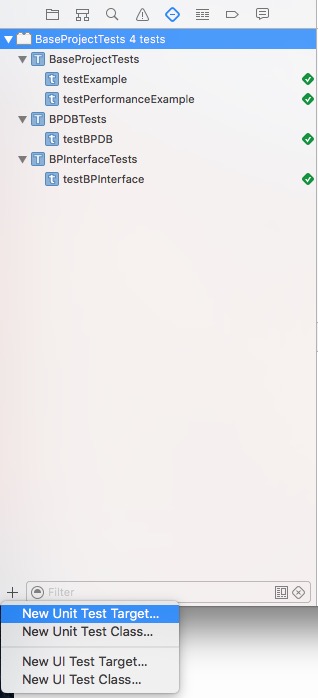
0、Command+5,click + at the bottom left corner then choose New Unit Test Target… to add test target or choose New Unit Test Class… to add test class.
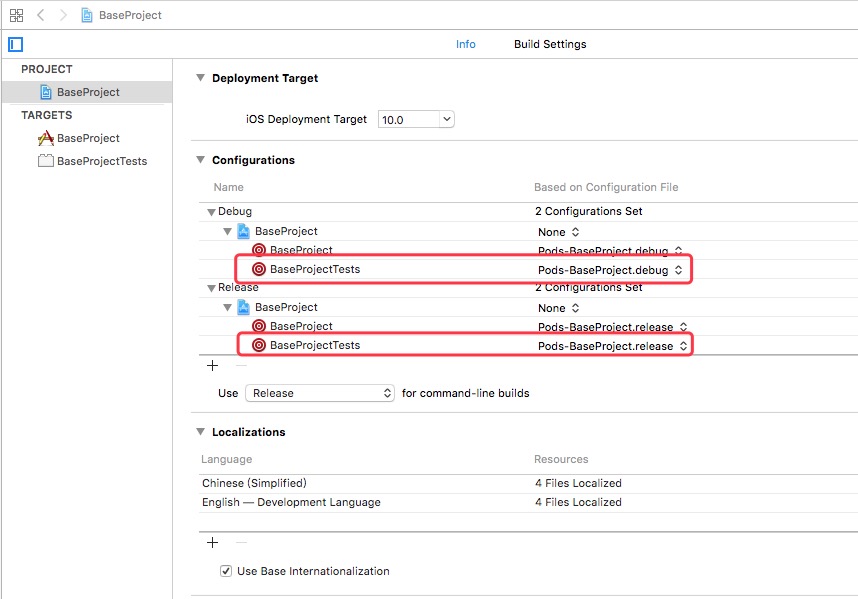
1、Replace None with Pods in Project->Info->Configurations. Add Prefix Header in Test Target->BuildSettings like project target.
2、Write some testing methods with names beginning with test in test class then Command+U to check all classes or click Run button in the gutter to check single class or single method.
- (void)setUp {
    [super setUp];
    // Put setup code here. This method is called before the invocation of each test method in the class.
}

- (void)tearDown {
    // Put teardown code here. This method is called after the invocation of each test method in the class.
    [super tearDown];
}

- (void)testExample {
    // This is an example of a functional test case.
    // Use XCTAssert and related functions to verify your tests produce the correct results.
}

- (void)testPerformanceExample {
    // This is an example of a performance test case.
    [self measureBlock:^{
        // Put the code you want to measure the time of here.
    }];
}