Build HTTPS Server
Remember that CA has a root certificate which can verify the certificate
signed by the private key of CA.
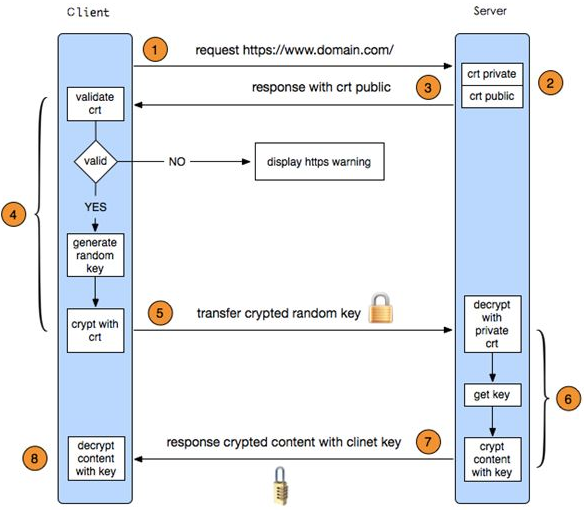
0. Apply SSL certificate
Apply the certificate on this set for free: https://buy.wosign.com/free/#ssl
If don’t have a domain, we can create a certificate with keytool.
$ cd $JAVA_HOME/bin
$ keytool -genkey -alias tomcat -keyalg RSA
It will create a .keystore file on your user home directory.
1. Setup JDK and Tomcat
$ java -versionIf command not found, download JDK and setup.- Go into apache-tomcat-x.x.x.xx/bin directory and
$ ./startup.sh. If there appear Permission denied,$ sudo chmod 755 apache-tomcat-x.x.x.xx/bin/*.sh. Fire up a browser and go to http://localhost:8080 to check it ok or not.
2. Configure the server.xml
Open apache-tomcat-x.x.x.xx/conf/server.xml then replace the following code:
<Connector port="8080" protocol="HTTP/1.1"
           connectionTimeout="20000"
           redirectPort="8443" />

<!--
<Connector port="8443" protocol="org.apache.coyote.http11.Http11NioProtocol"
         maxThreads="150" SSLEnabled="true">
  <SSLHostConfig>
      <Certificate certificateKeystoreFile="conf/keystore-rsa.pem"
                   type="RSA" />
  </SSLHostConfig>
</Connector>
-->

<Connector port="8009" protocol="AJP/1.3" redirectPort="8443"
with the following code:
<Connector port="80" protocol="HTTP/1.1"
           connectionTimeout="20000"
           redirectPort="443" />

<Connector port="443" protocol="org.apache.coyote.http11.Http11NioProtocol"
          maxThreads="150" SSLEnabled="true" scheme="https" secure="true"
          keystoreFile="/Users/GeekRRK/.keystore"
          keystorePass="password"
          clientAuth="false" sslProtocol="TLS">
   <!-- <SSLHostConfig>
       <Certificate certificateKeystoreFile="conf/keystore-rsa.pem"
                    type="RSA" />
   </SSLHostConfig> -->
</Connector>

<Connector port="8009" protocol="AJP/1.3" redirectPort="443" />
3. Make http redirect to https
Open apache-tomcat-x.x.x.xx/conf/web.xml and add the following code before </web-app>.
<security-constraint>
       <web-resource-collection >
              <web-resource-name >SSL</web-resource-name>
              <url-pattern>/*</url-pattern>
       </web-resource-collection>

       <user-data-constraint>
              <transport-guarantee>CONFIDENTIAL</transport-guarantee>
       </user-data-constraint>
</security-constraint>
4. Test locally
$ lsof -i:443
$ netstat -an | grep 443
$ ps -ef |grep tomcat
$ kill -9 pid
$ ./startup.sh
$ tail -f ../logs/catalina.out
Fire up a browser on another computer, because the port 80 and 443 is
already occupied by the browser of the https server, and go to localhost.
If use the certificate applied from CA, we can test it locally by changing
the IP of the domain, which the SSL certificate binds, to 127.0.0.1 in /etc/hosts.
Then go to the domain.