Framework
Dynamic Framework
0. Create a Cocoa Touch Framework
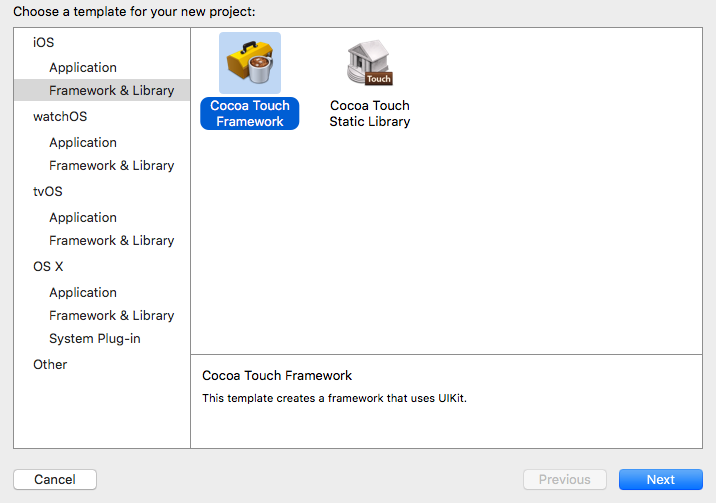
Write some class and put their headers into the header of framework while must
place them into the public zone.
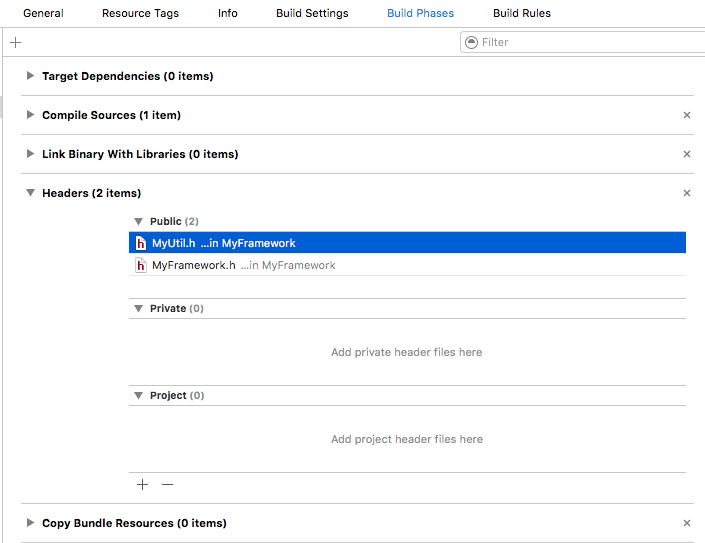
1. Build twice for simulator and iPhones
These steps are same as Static Library
except combining the two frameworks into one. So make the aggregate framework.
If use lipo command to combine them, remember to go into the direcotry
of framework and find the same name file which is the lib.
Create Aggregate Target in the existing framework project.
File -> New -> Target
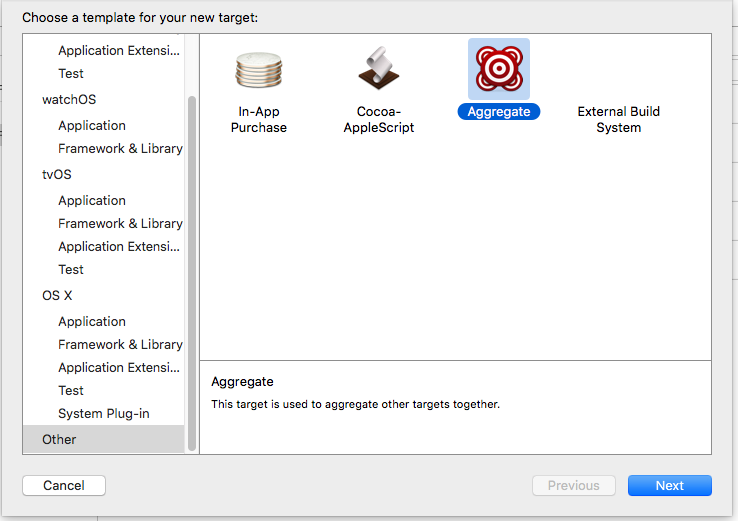
Choose the target and click the + to add the New Run Script Phase
Put the following script into it.
# Sets the target folders and the final framework product.
# If the name of project is different from the target name of the
# framework, we should define the FMKNAME, for example,
# FMK_NAME = "MyFramework"
FMK_NAME=${PROJECT_NAME}
# Install dir will be the final output to the framework.
# The following line create it in the root folder of the current project.
INSTALL_DIR=${SRCROOT}/Products/${FMK_NAME}.framework
# Working dir will be deleted after the framework creation.
WRK_DIR=build
DEVICE_DIR=${WRK_DIR}/Release-iphoneos/${FMK_NAME}.framework
SIMULATOR_DIR=${WRK_DIR}/Release-iphonesimulator/${FMK_NAME}.framework
# -configuration ${CONFIGURATION}
# Clean and Building both architectures.
xcodebuild -configuration "Release" -target "${FMK_NAME}" -sdk iphoneos clean build
xcodebuild -configuration "Release" -target "${FMK_NAME}" -sdk iphonesimulator clean build
# Cleaning the oldest.
if [ -d "${INSTALL_DIR}" ]
then
rm -rf "${INSTALL_DIR}"
fi
mkdir -p "${INSTALL_DIR}"
cp -R "${DEVICE_DIR}/" "${INSTALL_DIR}/"
# Uses the Lipo Tool to merge both binary files (i386 + armv6/armv7) into one Universal final product.
lipo -create "${DEVICE_DIR}/${FMK_NAME}" "${SIMULATOR_DIR}/${FMK_NAME}" -output "${INSTALL_DIR}/${FMK_NAME}"
rm -r "${WRK_DIR}"
open "${INSTALL_DIR}"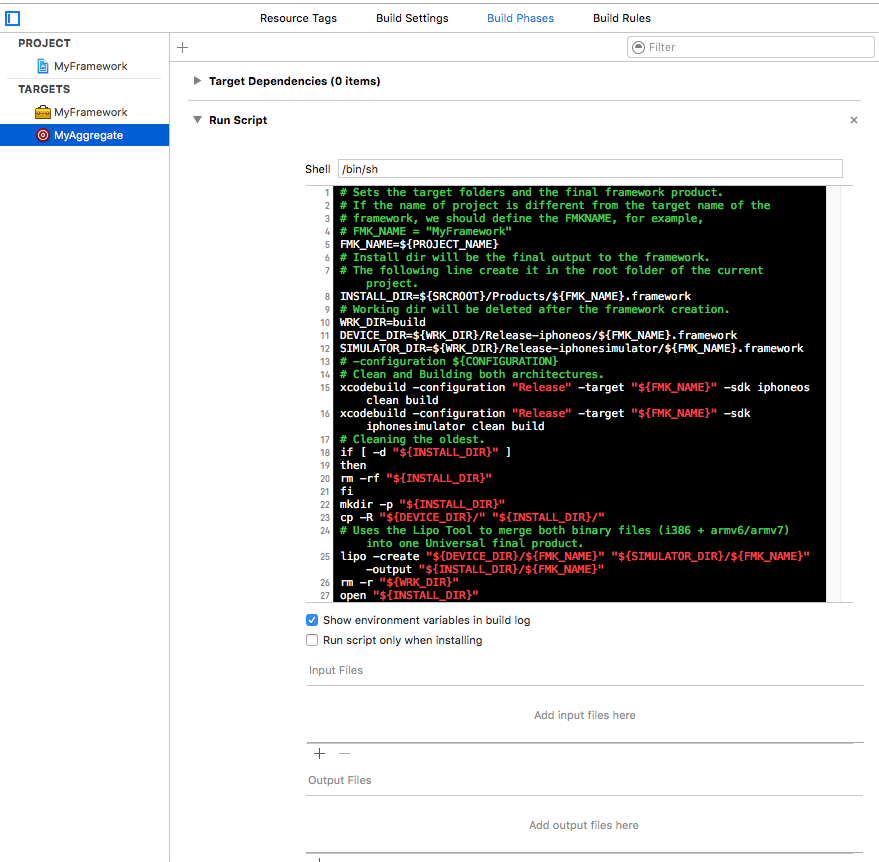
Choose the target and build. It will popup the aggregate framework in the finder if everything is ok.
2. Use the framework in another project
Remember to drag the framework into Embedded Binaries zone that is only
available in Xcode6+.
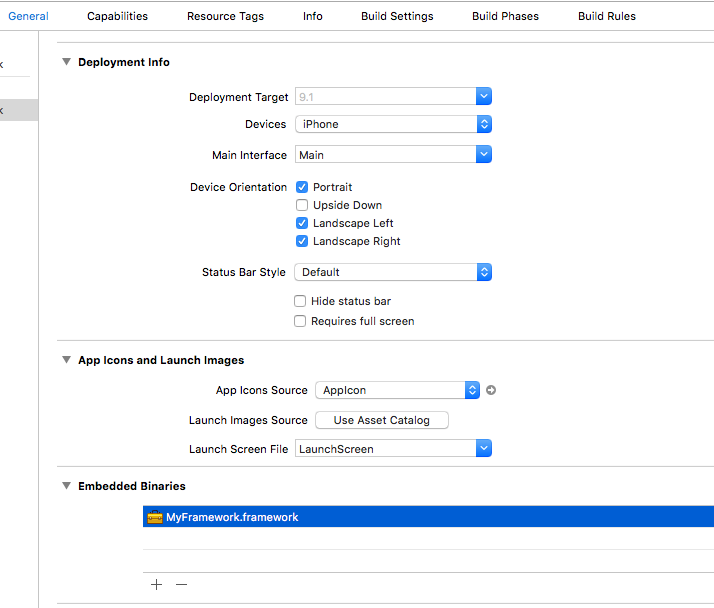
Static Library available in Xcode5-
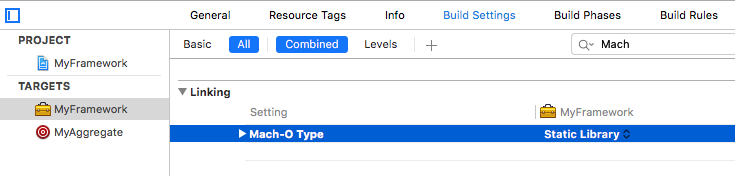
Now we don’t need to drag the framework into the Embedded Binaries zone
that doesn’t exist in Xcode5-.
Refer to: http://www.cnblogs.com/zhw511006/p/4155930.html
Use framework dynamically
0. Set Build Phases
Put the framework into the following zones.
Targets -> Build Phases -> Link Binary With Libraries
Targets -> Build Phases -> Copy Bundle Resources
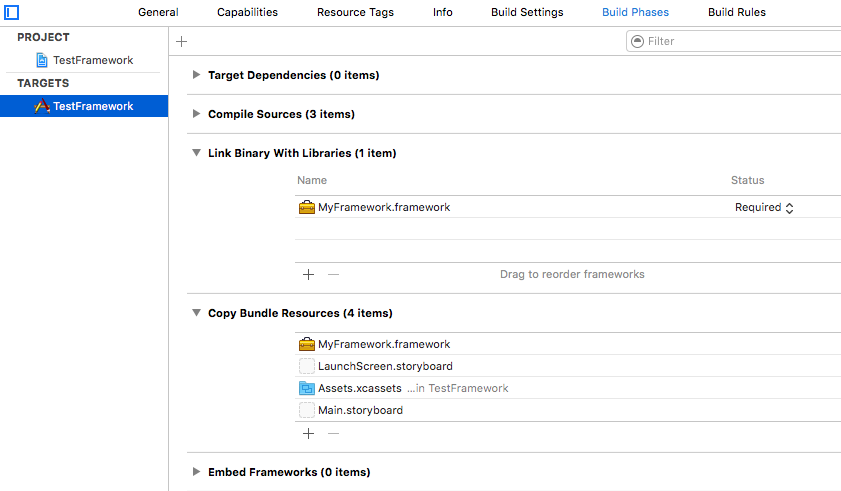
If want to link the framework automatically when the App launches, we can set
the dependent path of framework.
Targets -> Build Setting -> Linking -> Runpath Search Paths

@executable_path/ represents the directory of .app in sandbox, don’t miss the
/.
If don’t want to load the framework when the App launches, we can set the
Status to Optional in Link Binary With Libraries or delete it.

1. Load the framework
Use dlopen to load the framework, the real executable code is MyFramework.framework/MyFramework, so don’t forget MyFramework.
#import <dlfcn.h>
#import <mach-o/dyld.h>

//Be careful with the path of the framework we want to load with which method.
#define BUNDLEPATH_DLOPEN [[NSBundle mainBundle] pathForResource:@"MyFramework.framework/MyFramework" ofType:nil];
#define BUNDLEPATH_NSBUNDLE [[NSBundle mainBundle] pathForResource:@"MyFramework.framework" ofType:nil];

// This is for Documents path of sandbox when we download the framework
// to the sandbox. We can use *ZipArchive*, which depends *libz.dylib*
// or *libz.tbd*, to zip or unzip the framework. Remember when zip the framework,
// we should go into the directory of the framework to zip all, otherwise the
// directory of the framework will look like this: *.../MyFramework.framework/MyFramework.framework/...*
// #define DOCUMENTSPATH_DLOPEN [NSString stringWithFormat:@"%@/Documents/MyFramework.framework/MyFramework", NSHomeDirectory()];
// #define DOCUMENTSPATH_NSBUNDLE [NSString stringWithFormat:@"%@/Documents/MyFramework.framework", NSHomeDirectory()];
/*
This is another way to get the document directory of sandbox.
NSArray *paths = NSSearchPathForDirectoriesInDomains(NSDocumentDirectory, NSUserDomainMask, YES);
NSString *docDir = [paths objectAtIndex:0];
*/

- (IBAction)onDlopenLoadAtPathAction:(id)sender
{
    [self dlopenLoadDylibWithPath:BUNDLEPATH_DLOPEN];
}

- (void)dlopenLoadDylibWithPath:(NSString *)path
{
    void *libHandle = NULL;
    libHandle = dlopen([path cStringUsingEncoding:NSUTF8StringEncoding], RTLD_NOW);
    if (libHandle == NULL) {
        char *error = dlerror();
        NSLog(@"dlopen error: %s", error);
    } else {
        NSLog(@"dlopen load framework success.");
    }
}
Use NSBundle to load the framework, this time we should forget MyFramework, just use MyFramework.framework as the path.
- (IBAction)onBundleLoadAtPathAction:(id)sender
{
    [self bundleLoadDylibWithPath:BUNDLEPATH_NSBUNDLE];
}

- (void)bundleLoadDylibWithPath:(NSString *)path
{
    NSError *err = nil;
    NSBundle *bundle = [NSBundle bundleWithPath:path];
    if ([bundle loadAndReturnError:&err]) {
        NSLog(@"bundle load framework success.");
    } else {
        NSLog(@"bundle load framework err:%@",err);
    }
}
2. Invoke the method of the framework
- (IBAction)onTriggerButtonAction:(id)sender
{
    Class rootClass = NSClassFromString(@"MyUtil");
    if (rootClass) {
        id object = [[rootClass alloc] init];

        //If the framework is already imported into project
        [(MyUtil *)object showMsg];

        //If the method of the class in the framework we already known
        # pragma clang diagnostic push
        # pragma clang diagnostic ignored "-Warc-performSelector-leaks"
        SEL callFun = NSSelectorFromString(@"showMsg");
        [object performSelector:callFun withObject:nil];
        # pragma clang diagnostic pop
    }
}
3. Monitoring the adding and removing of frameworks
We can register the callback for the adding or removing of the framework.
static void image_added(const struct mach_header *mh, intptr_t slide)
{
    NSLog(@"add");
}

static void image_removed(const struct mach_header *mh, intptr_t slide)
{
    NSLog(@"remove");
}

+ (void)load
{
  _dyld_register_func_for_add_image(&image_added);
  _dyld_register_func_for_remove_image(&image_removed);
}
Refer to: http://foggry.com/blog/2014/06/12/wwdc2014zhi-iosshi-yong-dong-tai-ku/
Package resources into framework
0. Drag xib and image to Copy Bundle Resources of framework project.
Remember to drag them to Embedded Binaries if the framework is dynamic.
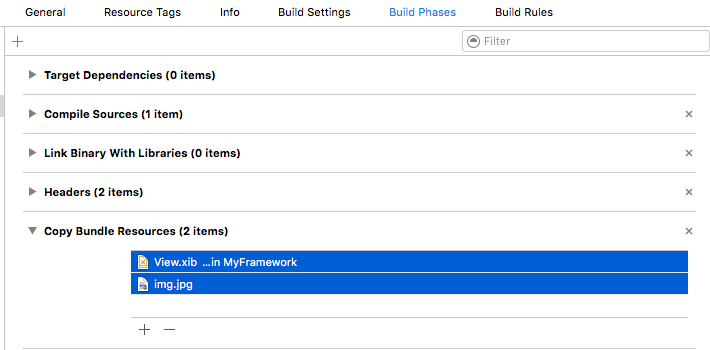
1. Choose aggregate and build.
We can find the xib and image in the directory of framework
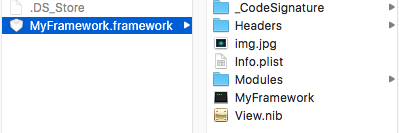
2. Load the xib and image from main bundle
[[NSBundle mainBundle]
loadNibNamed:@"MyFramework.framework/View"
       owner:nil
     options:nil];

[[NSBundle mainBundle] pathForResource:@"MyFramework.framework/img"
                                ofType:@"jpg"];
3. Load resource from other bundle.
Create a directory and put the image into it then name the direcotry as myBundle.bundle. Drag the bundle to our project.
+ (NSString *)pathForResource:(NSString *)name ofType:(NSString *)type {
    NSBundle *myBundle = [NSBundle
      bundleWithPath:[[NSBundle mainBundle]
     pathForResource:@"myBundle"
              ofType:@"bundle"]];
    [myBundle load];
    NSString* path = [myBundle pathForResource:name ofType:type];
    return path;
}
Refer to: http://blog.csdn.net/xyxjn/article/details/42527341
When finish this blog, we might wonder that can we use this tech as dynamic
plugin and bypass the review of AppStore. People say it won’t work because
_CodeSignature or something else. And Apple Inc. only allow the lua
to update App dynamically. See this site: http://www.cocoachina.com/bbs/read.php?tid=129723
Learn more about lua:
http://blog.csdn.net/wildfireli/article/details/19057809
http://devshen.github.io/2015/01/30/Use_Lua_in_iOS/
http://blog.jobbole.com/70480/
This is my project using framework: https://github.com/GeekRRK/DyLoadFramework